Users & admin
calit is multi-tenant: each user has a fully isolated scheduling setup. Site admins have an additional management interface for all user accounts.
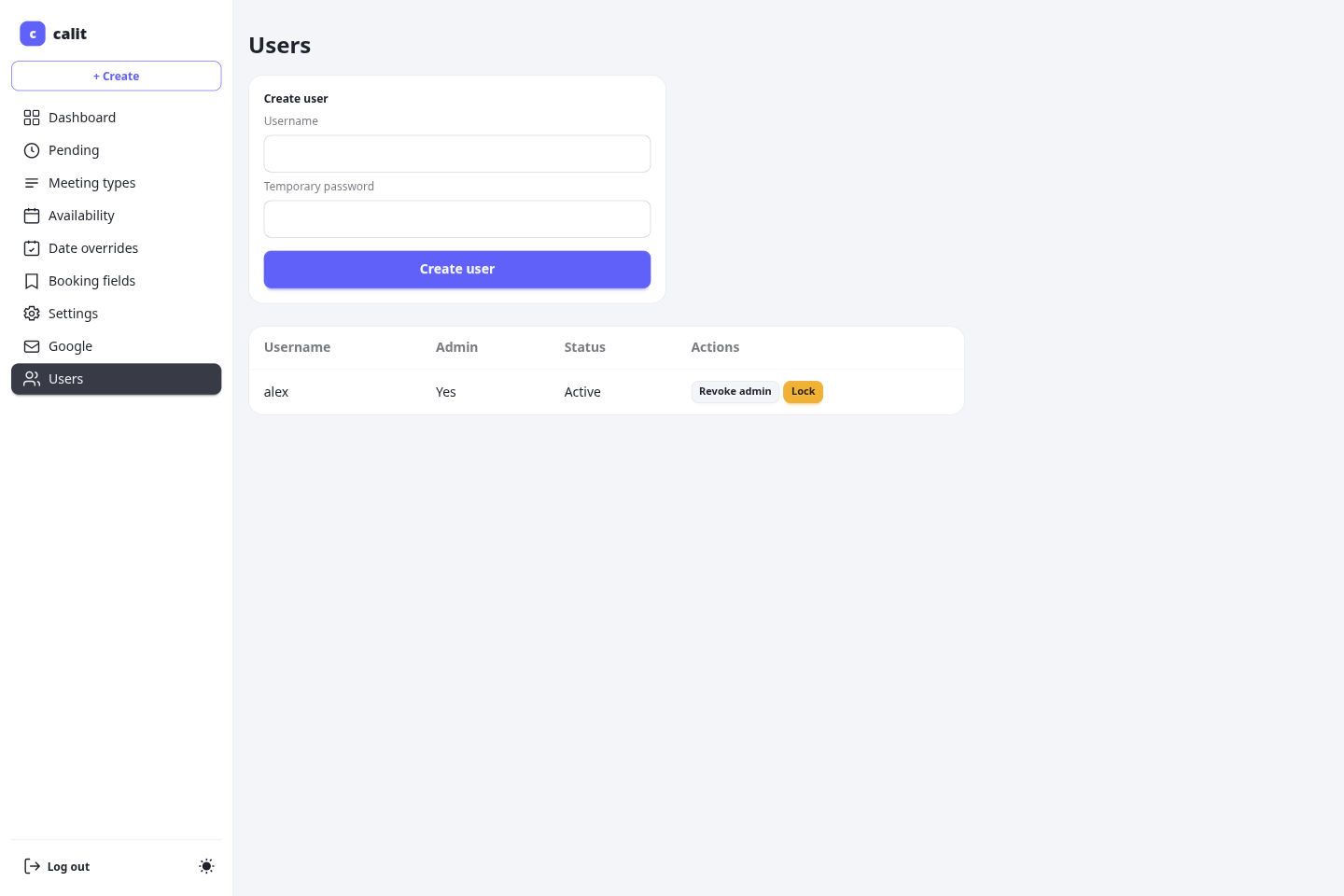
Site admins
Section titled “Site admins”Users with the is_admin flag are site administrators. The first user created via /setup receives this flag automatically. Admins access the user management interface at /me/users.
From there, admins can:
- View all registered user accounts.
- Create a new user by invitation (see below).
- Lock or unlock an account — see Locking an account.
- Promote or demote the admin role on existing accounts.
- Delete an account — see Deleting an account.
Locking an account
Section titled “Locking an account”Locking takes an account out of service entirely, not just out of the login form:
- The user cannot log in.
- Their landing page at
/<username>, and every meeting type under it, returns 404 — nobody can book them. - The JSON booking API refuses bookings for them for the same reason.
- Invitees holding a manage link for one of their existing bookings can no longer reschedule it or edit its details, since that would put a new time on the calendar of someone who has left. They can always still cancel.
Unlocking restores all of it.
Deleting an account
Section titled “Deleting an account”Any user can delete their own account from Settings → Delete my account (/me/settings/delete), confirming with their password, or with their username if they sign in only through Google or SSO. A site admin can delete another account with the Delete link in /me/users: it opens a confirm page (/me/users/{id}/delete) naming the account, and the admin must type that account’s username. A mismatch deletes nothing.
- Upcoming pending and confirmed bookings on the account’s own meeting types are cancelled first, including every host’s copy of a multi-host booking. Invitees, guests and co-hosts get the usual cancellation email, and the calendar event (Google or CalDAV) is deleted where the calendar provider is reachable.
- Deletion then removes the account, its settings, meeting types, availability, bookings, connected Google accounts and notification channels. The deleted user gets no email.
- The last enabled admin cannot be deleted. An admin deletes their own account from Settings, not from
/me/users. - It does not revoke calit’s access at Google; the user does that in their Google account.
- The username can never be used again: calit keeps a hash of it so a stale login cookie cannot attach to a new account.
Before deleting, a user can download everything calit holds about their account as JSON with Download all my data in Settings (/me/export). In the same place, Delete booking details after (days) sets how long their bookings keep invitee details; leave it blank to use the site default. See the GDPR operator guide.
Inviting a user
Section titled “Inviting a user”To add a user, an admin enters their username and email address — no password. calit creates the account in a dormant state (it cannot be logged into yet) and emails the person an invitation with a link to set their own password and activate the account.
- The activation link is valid for 48 hours and can be used once.
- Until they activate, the account shows Awaiting activation in the user list. Dormant accounts cannot log in.
- If the link expires or the email is lost, use Resend invite next to the pending user to send a fresh 48-hour link.
- Activating the account takes the user through the normal first-run setup so they can complete their profile and availability.
The invitation email is sent using your configured mail server (MAIL_*) and the public base URL (APP_BASE_URL) — no additional configuration is required.
Data isolation (owner scoping)
Section titled “Data isolation (owner scoping)”Every piece of data — meeting types, availability rules, bookings, settings — is tied to the user who owns it. One user can never read or modify another user’s data. This applies at the database query level; there is no admin override that exposes another user’s private data.
Public signup
Section titled “Public signup”By default, /signup returns 404 and no new users can self-register. To allow public registration, set the environment variable:
SIGNUP_ENABLED=trueThis requires a server restart to take effect (the setting is read at startup). Set it back to false and restart to close registration again.
When signup is enabled, new accounts are created as regular users (not admins). Admins can later grant the admin role through /me/users.
Related configuration
Section titled “Related configuration”See Configuration for the full list of environment variables including SIGNUP_ENABLED and user-related settings.